

experimental
experimental.fsModuleCache 4.0.11+
FEEDBACK
Please leave feedback regarding this feature in a GitHub Discussion.
- Type:
boolean - Default:
false
Enabling this option allows Vitest to keep cached modules on the file system, making tests run faster between reruns.
You can delete the old cache by running vitest --clearCache.
BROWSER SUPPORT
At the moment, this option does not affect the browser.
You can debug if your modules are cached by running vitest with a DEBUG=vitest:cache:fs environment variable:
DEBUG=vitest:cache:fs vitest --experimental.fsModuleCacheKnown Issues
Vitest creates a persistent file hash based on file content, its id, Vite's environment configuration and coverage status. Vitest tries to use as much information as it has about the configuration, but it is still incomplete. At the moment, it is not possible to track your plugin options because there is no standard interface for it.
If you have a plugin that relies on things outside the file content or the public configuration (like reading another file or a folder), it's possible that the cache will get stale. To work around that, you can define a cache key generator to specify a dynamic option or to opt out of caching for that module:
import { defineConfig } from 'vitest/config'

export default defineConfig({
  plugins: [
    {
      name: 'vitest-cache',
      configureVitest({ experimental_defineCacheKeyGenerator }) {
        experimental_defineCacheKeyGenerator(({ id, sourceCode }) => {
          // never cache this id
          if (id.includes('do-not-cache')) {
            return false
          }

          // cache this file based on the value of a dynamic variable
          if (sourceCode.includes('myDynamicVar')) {
            return process.env.DYNAMIC_VAR_VALUE
          }
        })
      }
    }
  ],
  test: {
    experimental: {
      fsModuleCache: true,
    },
  },
})
If you are a plugin author, consider defining a cache key generator in your plugin if it can be registered with different options that affect the transform result.
On the other hand, if your plugin should not affect the cache key, you can opt out by setting api.vitest.experimental.ignoreFsModuleCache to true:
import { defineConfig } from 'vitest/config'

export default defineConfig({
  plugins: [
    {
      name: 'vitest-cache',
      api: {
        vitest: {
          experimental: {
            ignoreFsModuleCache: true,
          },
        },
      },
    },
  ],
  test: {
    experimental: {
      fsModuleCache: true,
    },
  },
})
Note that you can still define the cache key generator even if the plugin opts out of module caching.
experimental.fsModuleCachePath 4.0.11+
- Type:
string - Default:
'node_modules/.experimental-vitest-cache'
Directory where the file system cache is located.
By default, Vitest will try to find the workspace root and store the cache inside the node_modules folder. The root is based on your package manager's lockfile (for example, .package-lock.json, .yarn-state.yml, .pnpm/lock.yaml and so on).
At the moment, Vitest ignores the test.cache.dir or cacheDir options completely and creates a separate folder.
experimental.openTelemetry 4.0.11+
FEEDBACK
Please leave feedback regarding this feature in a GitHub Discussion.
- Type:
interface OpenTelemetryOptions {
  enabled: boolean
  /**
   * A path to a file that exposes an OpenTelemetry SDK for Node.js.
   */
  sdkPath?: string
  /**
   * A path to a file that exposes an OpenTelemetry SDK for the browser.
   */
  browserSdkPath?: string
}- Default:
{ enabled: false }
This option controls OpenTelemetry support. Vitest imports the SDK file in the main thread and before every test file, if enabled is set to true.
PERFORMANCE CONCERNS
OpenTelemetry may significantly impact Vitest performance; enable it only for local debugging.
You can use a custom service together with Vitest to pinpoint which tests or files are slowing down your test suite.
For browser mode, see the Browser Mode section of the OpenTelemetry guide.
An sdkPath is resolved relative to the root of the project and should point to a module that exposes a started SDK instance as a default export. For example:
import { getNodeAutoInstrumentations } from '@opentelemetry/auto-instrumentations-node'
import { OTLPTraceExporter } from '@opentelemetry/exporter-trace-otlp-proto'
import { NodeSDK } from '@opentelemetry/sdk-node'

const sdk = new NodeSDK({
  serviceName: 'vitest',
  traceExporter: new OTLPTraceExporter(),
  instrumentations: [getNodeAutoInstrumentations()],
})

sdk.start()
export default sdkimport { defineConfig } from 'vitest/config'
export default defineConfig({
test: {
experimental: {
openTelemetry: {
enabled: true,
sdkPath: './otel.js',
},
},
},
})WARNING
It's important that Node can process sdkPath content because it is not transformed by Vitest. See the guide on how to work with OpenTelemetry inside of Vitest.
experimental.importDurations 4.1.0+
FEEDBACK
Please leave feedback regarding this feature in a GitHub Discussion.
- Type:
interface ImportDurationsOptions {
  /**
   * When to print import breakdown to CLI terminal.
   * - false: Never print (default)
   * - true: Always print
   * - 'on-warn': Print only when any import exceeds warn threshold
   */
  print?: boolean | 'on-warn'
  /**
   * Fail the test run if any import exceeds the danger threshold.
   * When enabled and threshold exceeded, breakdown is always printed.
   * @default false
   */
  failOnDanger?: boolean
  /**
   * Maximum number of imports to collect and display.
   */
  limit?: number
  /**
   * Duration thresholds in milliseconds for coloring and warnings.
   */
  thresholds?: {
    /** Threshold for yellow/warning color. @default 100 */
    warn?: number
    /** Threshold for red/danger color and failOnDanger. @default 500 */
    danger?: number
  }
}- Default:
{ print: false, failOnDanger: false, limit: 0, thresholds: { warn: 100, danger: 500 } }(limitis 10 ifprintor UI is enabled)
Configure import duration collection and display.
The print option controls CLI terminal output. The limit option controls how many imports to collect and display. Vitest UI can always toggle the breakdown display regardless of the print setting.
- Self: the time it took to import the module, excluding static imports;
- Total: the time it took to import the module, including static imports. Note that this does not include
transformtime of the current module.
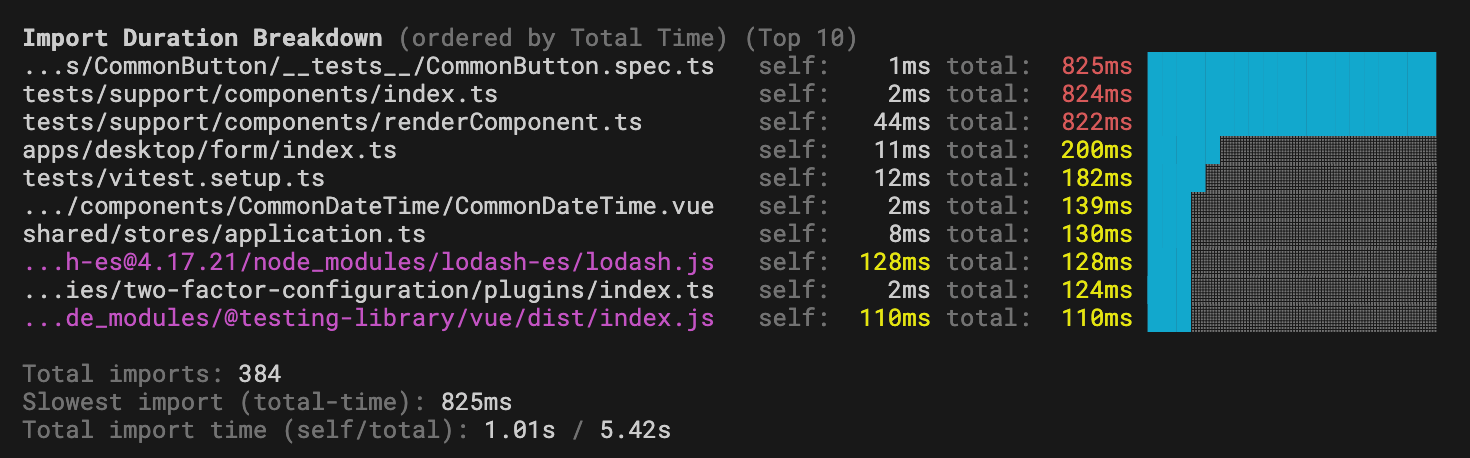
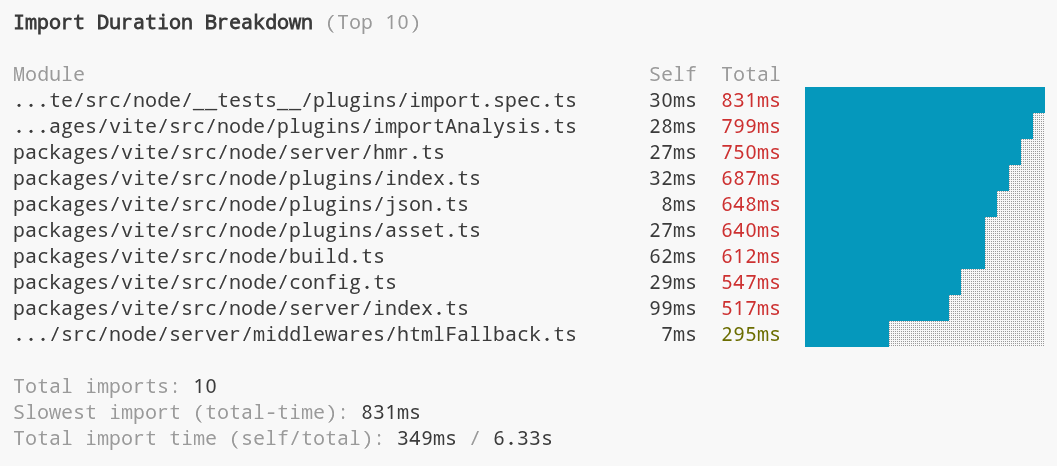
Note that if the file path is too long, Vitest will truncate it at the start until it fits 45 character limit.
experimental.importDurations.print
- Type:
boolean | 'on-warn' - Default:
false
Controls when to print import breakdown to CLI terminal after tests finish. This only works with default, verbose, or tree reporters.
false: Never print breakdowntrue: Always print breakdown'on-warn': Print only when any import exceeds thethresholds.warnvalue
experimental.importDurations.failOnDanger
- Type:
boolean - Default:
false
Fail the test run if any import exceeds the thresholds.danger value. When enabled and the threshold is exceeded, the breakdown is always printed regardless of the print setting.
This is useful for enforcing import performance budgets in CI:
vitest --experimental.importDurations.failOnDangerexperimental.importDurations.limit
- Type:
number - Default:
0(or10ifprint,failOnDanger, or UI is enabled)
Maximum number of imports to collect and display in CLI output, Vitest UI, and third-party reporters.
experimental.importDurations.thresholds
- Type:
{ warn?: number; danger?: number } - Default:
{ warn: 100, danger: 500 }
Duration thresholds in milliseconds for coloring and warnings:
warn: Threshold for yellow/warning color (default: 100ms)danger: Threshold for red/danger color andfailOnDanger(default: 500ms)
INFO
Vitest UI shows a breakdown of imports automatically if at least one file took longer than the danger threshold to load.
experimental.viteModuleRunner 4.1.0+
- Type:
boolean - Default:
true
Controls whether Vitest uses Vite's module runner to run the code or fallback to the native import.
If this option is defined in the root config, all projects will inherit it automatically.
Consider disabling the module runner if you are running tests in the same environment as your code (server backend or simple scripts, for example). However, we still recommend running jsdom/happy-dom tests with Vite's module runner or in the browser since it doesn't require any additional configuration.
Disabling this flag will disable all file transforms:
- test files and your source code are not processed by Vite
- your global setup files are not processed
- your custom runner/pool/environment files are not processed
- your config file is still processed by Vite (this happens before Vitest knows the
viteModuleRunnerflag)
WARNING
At the moment, Vitest still requires Vite for certain functionality like the module graph or watch mode.
Also note that this option only works with forks or threads pools.
Module Runner
By default, Vitest runs tests in a very permissive module runner sandbox powered by Vite's Environment API. Every file is categorized as either an "inline" module or an "external" module.
Module runner runs all "inlined" modules. It provides import.meta.env, require, __dirname, __filename, static import, and has its own module resolution mechanism. This makes it very easy to run code when you don't want to configure the environment and just need to test that the bare JavaScript logic you wrote works as intended.
All "external" modules run in native mode, meaning they are executed outside of the module runner sandbox. If you are running tests in Node.js, these files are imported with the native import keyword and processed by Node.js directly.
While running JSDOM/happy-dom tests in a permissive fake environment might be justified, running Node.js tests in a non-Node.js environment can hide and silence potential errors you may encounter in production, especially if your code doesn't require any additional transformations provided by Vite plugins.
Known Limitations
Some Vitest features rely on files being transformed. Vitest uses synchronous Node.js Loaders API to transform test files and setup files to support these features:
WARNING
This means that Vitest requires at least Node 22.15 for those features to work. At the moment, they also do not work in Deno or Bun.
Vitest will only detect vi.mock and vi.hoisted inside of test files, they will not be hoisted inside imported modules.
This could affect performance because Vitest needs to read the file and process it. If you do not use these features, you can disable the transforms by setting experimental.nodeLoader to false. Vitest only reads test files and setup files while looking for vi.mock or vi.hoisted. Using these in other files won't hoist them to the top of the file and can lead to unexpected behavior.
Some features will not work due to the nature of viteModuleRunner, including:
- no
import.meta.env:import.meta.envis a Vite feature, useprocess.envinstead - no
plugins: plugins are not applied because there is no transformation phase, use customization hooks viaexecArgvinstead - no
alias: aliases are not applied because there is no transformation phase istanbulcoverage provider doesn't work because there is no transformation phase, usev8instead
Coverage Support
At the momemnt Vitest supports coverage via v8 provider as long as files can be transformed into JavaScript. To transform TypeScript, Vitest uses module.stripTypeScriptTypes which is available in Node.js since v22.13. If you are using a custom module loader, Vitest is not able to reuse it to transform files for analysis.
With regards to mocking, it is also important to point out that ES modules do not support property override. This means that code like this won't work anymore:
import * as fs from 'node:fs'
import { vi } from 'vitest'

vi.spyOn(fs, 'readFileSync').mockImplementation(() => '42') // ❌
However, Vitest supports auto-spying on modules without overriding their implementation. When vi.mock is called with a spy: true argument, the module is mocked in a way that preserves original implementations, but all exported functions are wrapped in a vi.fn() spy:
import * as fs from 'node:fs'
import { vi } from 'vitest'

vi.mock('node:fs', { spy: true })

fs.readFileSync.mockImplementation(() => '42') // ✅
Factory mocking is implemented using a top-level await. This means that mocked modules cannot be loaded with require() in your source code:
vi.mock('node:fs', async (importOriginal) => {
  return {
    ...await importOriginal(),
    readFileSync: vi.fn(),
  }
})

const fs = require('node:fs') // throws an error
This limitation exists because factories can be asynchronous. This should not be a problem because Vitest doesn't mock builtin modules inside node_modules, which is simillar to how Vitest works by default.
TypeScript
If you are using Node.js 22.18/23.6 or higher, TypeScript will be transformed natively by Node.js.
TypeScript with Node.js 22.6-22.18
If you are using Node.js version between 22.6 and 22.18, you can also enable native TypeScript support via --experimental-strip-types flag:
NODE_OPTIONS="--experimental-strip-types" vitestIf you are using TypeScript and Node.js version lower than 22.6, then you will need to either:
- build your test files and source code and run those files directly
- import a custom loader via
execArgvflag
import { defineConfig } from 'vitest/config'

const tsxApi = import.meta.resolve('tsx/esm/api')

export default defineConfig({
  test: {
    execArgv: [
      `--import=data:text/javascript,import * as tsx from "${tsxApi}";tsx.register()`,
    ],
    experimental: {
      viteModuleRunner: false,
    },
  },
})
If you are running tests in Deno, TypeScript files are processed by the runtime without any additional configurations.
experimental.nodeLoader 4.1.0+
- Type:
boolean - Default:
true
If module runner is disabled, Vitest uses a native Node.js module loader to transform files to support import.meta.vitest, vi.mock and vi.hoisted.
If you don't use these features, you can disable this to improve performance.